Install ROS in reComputer
Introduction
ROS (Robot Operating System) is an open-source framework for building robot software. It is not actually an operating system, but rather a flexible middleware that provides tools, libraries, and conventions to simplify the development of complex and distributed robotic systems.
Key features of ROS include:
- Modular Design It organizes software into packages and nodes, making code reusable and easy to maintain.
- Communication Infrastructure ROS uses a publisher/subscriber model for message passing and a service/action system for request/response interactions between nodes.
- Simulation and Visualization Tools like RViz and Gazebo allow developers to visualize sensor data and simulate robots in a virtual environment.
- Hardware Abstraction ROS provides drivers for many sensors and actuators, making it easier to integrate real-world hardwar
This tutorial will show you how to install the development environment for ROS1 and ROS2 on reComputer.
Note: Please select different ROS versions based on the version of Ubuntu in your system.
| JetPack Version | Ubuntu Version | Recommended ROS Version | Use Case |
|---|---|---|---|
| JetPack 5.x | Ubuntu 20.04 | ROS1 Noetic / ROS2 Foxy | Best choice for projects needing ROS1/ROS2 hybrid development, long-term support, and stable ecosystem. |
| JetPack 6.x | Ubuntu 22.04 | ROS2 Humble | Ideal for new projects, long-term maintenance, and leveraging Jetson Orin / newer hardware features. ROS1 not officially available (use Docker or build from source if needed). |
Install ROS1
ROS1 (Robot Operating System 1) is an open-source framework for building robot software. It uses a central master (roscore) and a node-based architecture, where nodes communicate via topics, services, and actions. ROS1 provides tools for visualization, simulation, and data logging, and is widely used in robotics research and prototyping.
Step 1. Setup your computer to accept software from packages.ros.org.
sudo sh -c '. /etc/lsb-release && echo "deb http://mirrors.ustc.edu.cn/ros/ubuntu/ `lsb_release -cs` main" > /etc/apt/sources.list.d/ros-latest.list'Note: Please setting up your sources.list file based on the region where you are located.Follow by this artical
Step 2. Set up your keys.
sudo apt install curl gnupg2 lsb-release -y # if you haven't already installed curl

curl -s https://raw.githubusercontent.com/ros/rosdistro/master/ros.asc | sudo apt-key add -
Step 3. Installation.
sudo apt update
sudo apt install ros-noetic-desktop-full
sudo apt-get install python3-rosdep
sudo rosdep init
rosdep update
Step 4. Set Up ROS Environment.
echo "source /opt/ros/noetic/setup.bash">> ~/.bashrc &&
source ~/.bashrc
Step 5. Install Dependency Tools.
sudo apt install python3-rosinstall python3-rosinstall-generator python3-wstool build-essentialStep 6. Test the Installation.
roscore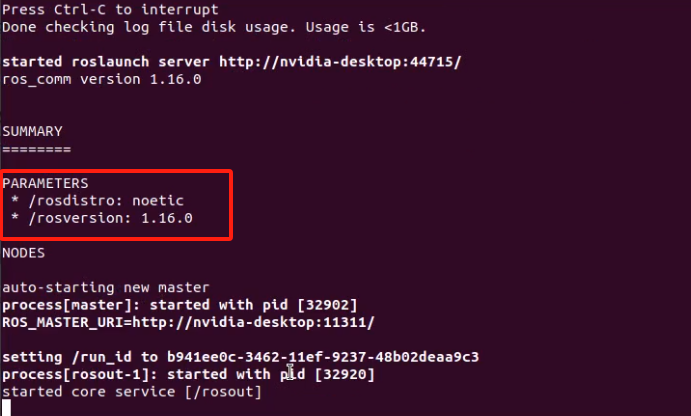
More details you can refer to here
Install ROS2
ROS2 (Robot Operating System 2) is the second generation of the open-source robotics framework, designed to overcome the limitations of ROS1. It is built on top of DDS (Data Distribution Service) for reliable, real-time, and secure communication. ROS2 supports multi-robot systems, works on multiple platforms (Linux, Windows, macOS), and offers improved performance, security, and scalability compared to ROS1.
Step 1. Set locale.
locale # check for UTF-8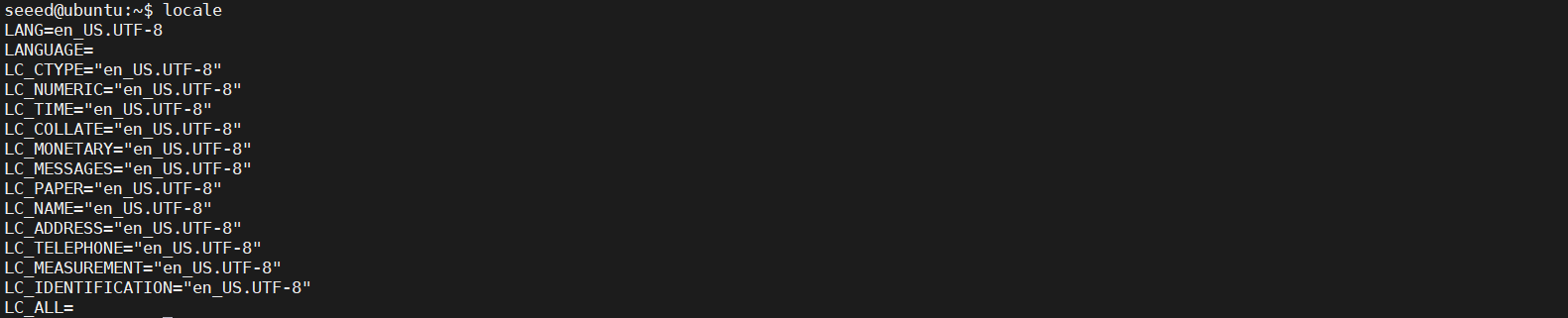
sudo apt update && sudo apt install locales
sudo locale-gen en_US en_US.UTF-8
sudo update-locale LC_ALL=en_US.UTF-8 LANG=en_US.UTF-8
export LANG=en_US.UTF-8
locale  # verify settings
Step 2. You will need to add the ROS 2 apt repository to your system.
sudo apt install software-properties-common
sudo add-apt-repository universe
Step 3. Add the official ROS2 apt repository to your Ubuntu system.
sudo apt update && sudo apt install curl -y
export ROS_APT_SOURCE_VERSION=$(curl -s https://api.github.com/repos/ros-infrastructure/ros-apt-source/releases/latest | grep -F "tag_name" | awk -F\" '{print $4}')
curl -L -o /tmp/ros2-apt-source.deb "https://github.com/ros-infrastructure/ros-apt-source/releases/download/${ROS_APT_SOURCE_VERSION}/ros2-apt-source_${ROS_APT_SOURCE_VERSION}.$(. /etc/os-release && echo $VERSION_CODENAME)_all.deb" # If using Ubuntu derivates use $UBUNTU_CODENAME
sudo dpkg -i /tmp/ros2-apt-source.deb
Step 4. Install ROS 2 packages.
sudo apt update
sudo apt install ros-humble-desktop
Step 5. Install Additional Build Tools.
sudo apt install ros-dev-toolsStep 6. Initialize ROS Environment.
sudo rosdep init
rosdep update
Step 7. Set Up ROS Environment Variables.
echo "source /opt/ros/humble/setup.bash" >> ~/.bashrc
source ~/.bashrc
Step 8. Try some examples to verify the installation.
In one terminal, source the setup file and then run a C++ talker:
source /opt/ros/humble/setup.bash
ros2 run demo_nodes_cpp talker
In another terminal source the setup file and then run a Python listener:
source /opt/ros/humble/setup.bash
ros2 run demo_nodes_py listener

Now, congratulations! 🎉You have successfully installed ROS2. You can now embark on a pleasant development journey.
More details you can refer to here
Resource
Related demo: